Tech Stack Workflow About Services FAQ Work With Us
BRIDGE Summit 2025 • Abu Dhabi

Prompt to Premiere

The definitive 2025 blueprint for creating cinematic AI video with character consistency. From one reference photo to a finished scene in about an hour.

Start the Workflow Work With Us
"The barrier to entry has vanished. The barrier to quality is now purely about Human Taste and the talent of the human using these tools."
— Peter Hollens, BRIDGE Summit 2025

AI can generate infinite content. Your job as the Director-Editor is to enforce ruthless creative direction. This workflow solves the #1 problem in AI video: character inconsistency—faces and clothes changing every shot.

The Setup

Your Tech Stack

Everything you need lives in three places. The brain for prompts, Gemini for storyboard planning, and Higgsfield for everything else.

The Brain

Structures strict, reusable prompts and shot lists. The foundation of consistency.

The Studio
Higgsfield AI — Nano Banana Pro

Best for character consistency and storyboard frames. Your anchor images live here.

The Engine
Higgsfield AI — Motion / Video Models

Turns your keyframes into high-quality image-to-video motion. Kling 2.6 lives inside Higgsfield.

The Assembly
Higgsfield AI — Sequence & Export

Trimming, pacing, and cleaning up any AI "hallucinations" inside one unified flow.

Why not juggle apps? Higgsfield is your "Hybrid Era" hub—prompts, images, motion, and assembly all live in one place. You get specialized power without bouncing between tools.
The Method

The 6-Phase Workflow

Follow these phases in order. Each step builds on the last. The secret is in Phase 3—the storyboard method that keeps your character consistent across every shot.

The Structured Prompt

Don't skip this—it's the foundation of consistency.

🧠 Tool: ChatGPT
  • Upload your reference photo (e.g., you at a piano bar) to ChatGPT
  • Use this exact command: "Turn this into a Nano Banana Pro prompt with sections: I. Subject, II. Setting & Context, III. Action & Mood, IV. Technical & Style. Add STRICT CONSISTENCY REQUIREMENTS."
  • Clean the output: remove duplicates, simplify actions, ensure face/clothing rules are explicit
Sample Strict Consistency Block STRICT CONSISTENCY REQUIREMENTS: - Maintain exact facial structure of reference image - Do not alter clothing color or style - Keep lighting temperature consistent (warm/moody) - Mouth closed unless specifically directed - No drastic pose changes between frames MOTION RULES: - Hands remain natural and relaxed - No sudden head rotations exceeding 30° - Maintain eye contact direction
Result

One clean "Master Prompt" that locks in your face, clothing, and lighting for every subsequent generation.

The "Anchor" Image

One perfect still becomes your reality anchor.

🎬 Tool: Higgsfield AI → Nano Banana Pro
  • Open Higgsfield AI and select Nano Banana Pro as your model
  • Upload your real photo as the reference image (drag and drop)
  • Paste your Master Prompt from Phase 1 into the prompt box
  • Generate a small batch (3-4 images) to give yourself options
  • Pick the Hero Image: correct face, correct lighting, right mood
Phase 2 Result: Hero Anchor Image
The Hero Image: Character, lighting, and environment locked in. This becomes the master reference for all subsequent shots.
!
Batch Size Strategy Generate 3-4 at a time to quickly compare options without burning credits. The "Unlimited" tier only generates one at a time, so batching is faster for selection.
Result

Your hero/base image. This is your "master look" for character, lighting, and environment. Every subsequent shot references this.

The Visual Storyboard

⭐ The Secret Sauce — Turn one good image into an entire cinematic sequence.

🔮 Tool: Gemini (for planning)
🎬 Tool: Higgsfield AI → Nano Banana Pro (for extraction)

The Problem: Generating shots separately = different face every time.
The Solution: Build everything from a single hero image and a single storyboard.

  • Start from your hero image: Take the best hero frame you generated in Higgsfield (Nano Banana Pro). This is your "master look" for character, lighting, and environment.
  • Send it to Gemini for story planning: Paste the hero image into Gemini. Ask Gemini to imagine a shot-by-shot sequence and lay it out as a storyboard grid:
    Shot 1: Wide shot — Empty bar, subject standing on stage Shot 2: Medium — Walking toward microphone, moody shadows Shot 3: Close-up — Eyes lifting to meet the mic Shot 4: Detail shot — Trembling hands on the mic stand Shot 5: Medium — Sitting at piano, fingers hovering Shot 6: Wide — Final pose, spotlight isolation
    Tell Gemini you want a cohesive storyboard with 6-9 panels in one image, all based on that same hero look.
  • Choose your storyboard: Pick the storyboard grid that best matches your narrative and camera ideas. Download that single storyboard image (the multi-panel grid).
  • Bring the storyboard back into Higgsfield: Upload the storyboard grid into Higgsfield. Use the Nano Banana Pro model and prompt:
    "Extract each panel in this storyboard into individual 4K images. Keep facial details consistent. Use Panel 1 as the main face reference."
  • Get your final frames: Higgsfield now gives you separate, clean stills with different camera angles, same character, same room and lighting. These frames are ready for animation.
Phase 3 Result: Storyboard Grid with Multiple Angles
The Storyboard Grid: Multiple camera angles, same character, same environment. All shots originate from ONE generation—this is why the face stays consistent.
!
Why This Works All shots originate from ONE hero image and ONE storyboard. The AI maintains character consistency because it's not starting fresh each time—it's subdividing a unified scene.
Result

6-9 perfectly related shots, all born from one hero image and one storyboard. This is why the final video feels cinematic instead of random.

Animation (The Kling Pass)

This is where your stills start breathing.

🎬 Tool: Higgsfield AI → Kling 2.6 (Image-to-Video)

You already have perfect frames from Higgsfield. Kling's job is ONLY to move the camera and the body subtly—not to reinvent the character.

Golden Rule: Do NOT re-describe who they are or what they look like. Only describe how the shot moves and what tiny actions happen.

❌ Bad Prompt (rewrites the whole scene)
"Man singing at piano in a bar, wearing a suit, dramatic lighting"
✅ Good Prompt (focuses only on motion + camera)
"Slow push-in toward the subject. Subtle micro-movement of eyes looking up toward the microphone. Hands tremble slightly on the mic stand. Cinematic shallow depth of field, no big body movement."

Recommended Settings in Kling:

  • Duration: 5-10 seconds per shot
  • Turn OFF "enhance prompt" if your motion prompt is already detailed
  • Keep identity/style locked by relying on the input frame, not the text, for how they look
  • You can turn audio on or off depending on whether you want ambient sound in the clip
!
Micro-Acting > Big Acting Big movements (running, jumping, waving arms) = higher chance of glitches. The most realistic "cinema" comes from micro-acting. Small movements + controlled camera motion = footage that feels filmed, not generated.

Best Micro-Acting Prompts:

  • A slow lift of the eyes
  • A tiny swallow or deep breath
  • Fingers tightening on the mic
  • A barely-there turn of the head
  • A small shift of weight from one foot to the other
Result

A set of 5-10 second video clips, one for each storyboard shot. Raw footage ready for assembly.

The Editor's Eye

AI generates 5 seconds. Usually only 2 are usable.

🎬 Tool: Premiere Pro (or CapCut)

The "Cherry Picking" Process:

  • Trim the Glitch: AI videos morph weirdly at start/end. Cut those frames ruthlessly.
  • The "Take" Selection: If you generated 3 versions of a hand movement, stack them in your timeline, compare, keep the most human one.
  • Pacing: Don't let clips linger. Quick cuts hide imperfections and maintain energy.

Eyeline Match: Ensure directional continuity (if subject walks right in wide shot, they're still oriented right in close-up).

Result

A trimmed, paced timeline with only the best seconds from each generation.

Polish & Export

  • Arrange clips in narrative order: Establishing → Action → Emotion → Resolution
  • Add music/sound design
  • Export
Result

A coherent, cinematic scene built from one reference photo and a clear workflow.
The Result

See It In Action

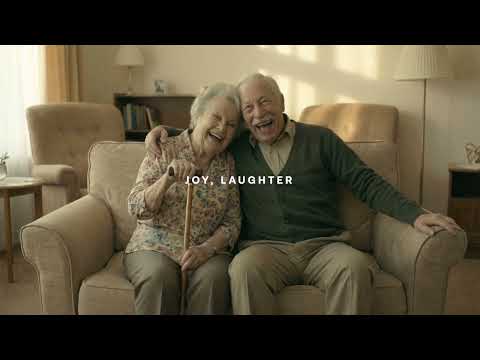
This ad was created using the exact 6-phase workflow above. One reference photo. Character consistency throughout. Prompt to Premiere.

Watch: Prompt to Premiere Example by Peter Hollens
▶ Watch on YouTube

30-60 minutes from blank screen to this. The workflow is real.

This is all possible now.

Want results like this without learning the tools yourself? We can do it for you.

Work With Us →
Peter Hollens
9M+
Followers
1.5B+
Video Views
15+
Years Digital
12+
Years @ Patreon

Peter Hollens

Peter Hollens stands at the intersection of AI innovation and the creator economy. A digital pioneer for over fifteen years, he's built an independent music empire generating over 1.5 billion views and 9 million followers across platforms. He founded the a cappella group On The Rocks (the inspiration for Pitch Perfect) and has partnered with Disney, Warner, and top global brands.

Today, Peter advises AI startups and creator-economy platforms, including a 12+ year advisory role at Patreon. He doesn't just keep up with technology—he helps shape how it's used in the creator space. His approach: use AI to amplify creative direction, not replace it.

Advisor @ Patreon Founder, Inhouse Creators Founder, Powerhouse AI Speaker @ VidCon, VidSummit BRIDGE Summit 2025

"If you're looking for someone who stands at the intersection of AI innovation and the creator economy, look no further than Peter Hollens. He's always my first call... Peter is the go-to person if you want to navigate the evolving landscape of creator and AI-driven business."

Rob Gabel
Chief Strategy Officer @ Spotter

Partner with the Director

"The workflow is public. The taste is proprietary. We help brands, studios, and artists implement this blueprint at the highest level."

01

The AI Identity System

For Founders, Creators & Companies

We build your AI infrastructure. We create your Master Prompts, Hero Anchors, and Style Guidelines so your internal team can generate infinite, consistent on-brand content.

Why it matters: Solves the #1 pain point (character consistency) immediately. Your team gets a reusable system, not just a one-off project.
Get the Protocol →
02

Cinematic Narrative Production

For Studios & Brands

Full-service narrative production. From music videos to brand films, we execute the entire 6-phase workflow for you. You provide the vision; we provide the "Director-Editor" execution.

Why it matters: You get access to taste and storytelling without learning the tools. Premium results, delivered.
Inquire →
03

Executive AI Creative Advisory

For C-Suite & Enterprise

Strategic consulting on ethical AI integration, creator economy alignment, and workflow implementation for creative teams. For studios and platforms building the future.

Why it matters: Brings "Human Taste" and ethical leadership to your internal AI stack. Not just tools—philosophy.
Contact Peter →

Start a Conversation

Tell us about your project. We'll get back to you within 48 hours.

By submitting, you agree to our Privacy Policy.

Direct Contact

General Inquiries
Business & Production
Response Time
Within 48 hours

Quick Links

peterhollens.com

All Links

LinkedIn

Common Questions

FAQ

Answers to the questions you'll have after your first few attempts.

Higgsfield is my Swiss-knife hub. All the models I need for prompting, lookdev, storyboards, and motion live inside Higgsfield—including Nano Banana Pro for structure and facial consistency, and Kling 2.6 for image-to-video. I don't have to juggle tabs or pay for multiple separate tools.

Best combo: Nano Banana Pro in Higgsfield for "thinking and looking," Kling in Higgsfield for "moving."

Phase 3 is the fix. Don't generate 10 separate images—generate ONE storyboard grid and extract frames from it. All shots originate from the same "parent" generation = same face. This is the single most important technique in the entire workflow.

VEO 3 understands prompts well, but Kling 2.6 currently produces sharper output. Use VEO-style prompting language inside Kling for best results. The workflow is tool-agnostic—the method matters more than the specific platform.

Once you have your Master Prompt dialed in, you can go from a blank screen to a finished 30-second cinematic scene in about 30-60 minutes. The longest wait is render time for video generation. Your first attempt will take longer as you learn the tools, but the workflow becomes muscle memory quickly.

Three fixes: (1) Turn OFF any "Creativity" or "Enhance Prompt" settings in Kling. (2) Keep your motion prompt focused only on camera and micro-movements—don't describe the character's appearance. (3) Rely on the input frame for identity, not the text. The less you ask the AI to imagine, the more it stays true to your reference.

For base images, keep the mouth closed—open mouths in stills often look unnatural when animated. If you need your character to speak, generate the base image with a closed mouth, then use a specialized lip-sync tool to add speech in post. This gives you more control and avoids the "uncanny valley" effect.

At a Glance

Quick Reference

The 6-Phase Workflow
Phase Tool Output
1. Prompt ChatGPT Master Prompt with Strict Consistency
2. Anchor Higgsfield — Nano Banana Pro Hero Image
3. Storyboard Gemini + Nano Banana Pro Grid → Extracted 4K Frames
4. Animate Higgsfield — Kling 2.6 5-10 second clips per shot
5. Edit Premiere / CapCut Trimmed, paced timeline
6. Export Final cinematic scene

🎯 The Director's Mindset

This workflow works because it treats AI as The Crew, not The Talent.

The Crew handles execution (rendering, variation, speed). You handle emotion, story, and taste.

The 69% of creators hiding their AI use? They're treating AI as a shortcut. The winners in 2026 will be the ones who use AI to amplify their creative direction—not replace it.

Privacy Policy

Last updated: December 2025

Information We Collect: When you submit the contact form, we collect your name, email address, company name (if provided), and project details. We do not use cookies for tracking or advertising purposes.

How We Use Your Information: We use the information you provide solely to respond to your inquiry and discuss potential collaboration. We do not sell, rent, or share your personal information with third parties except as necessary to provide our services.

Data Storage: Form submissions are processed through Formspree and delivered to our email. We retain inquiry data only as long as necessary to fulfill the purpose for which it was collected.

Your Rights: You may request access to, correction of, or deletion of your personal data at any time by contacting us at peterhollensmusic@gmail.com.

Contact: For privacy-related questions, email peterhollensmusic@gmail.com.

Terms of Service

Last updated: December 2025

Educational Content: The workflow, techniques, and information provided on this website are for educational purposes. Results may vary based on individual skill, tools used, and creative application.

Services: All consulting, production, and advisory services are subject to separate written agreements. Pricing, deliverables, and timelines will be confirmed in writing before any work begins.

Intellectual Property: The content, design, and branding of this website are owned by Peter Hollens / Hollens Inc. The workflow methodology is shared openly for educational use but may not be repackaged or sold as a competing product.

Third-Party Tools: This website references third-party tools (Higgsfield, ChatGPT, Gemini, Kling, etc.). We are not affiliated with these companies unless explicitly stated. Use of these tools is subject to their respective terms of service.

Limitation of Liability: We provide this information "as is" without warranties. We are not liable for any damages arising from the use of this website or the techniques described.

Contact: Questions about these terms? Email peterhollensmusic@gmail.com.